Agentic routing & scheduling · Pest control & lawn care
Supervised full self-routing.
A better route plan.
Your people in control.
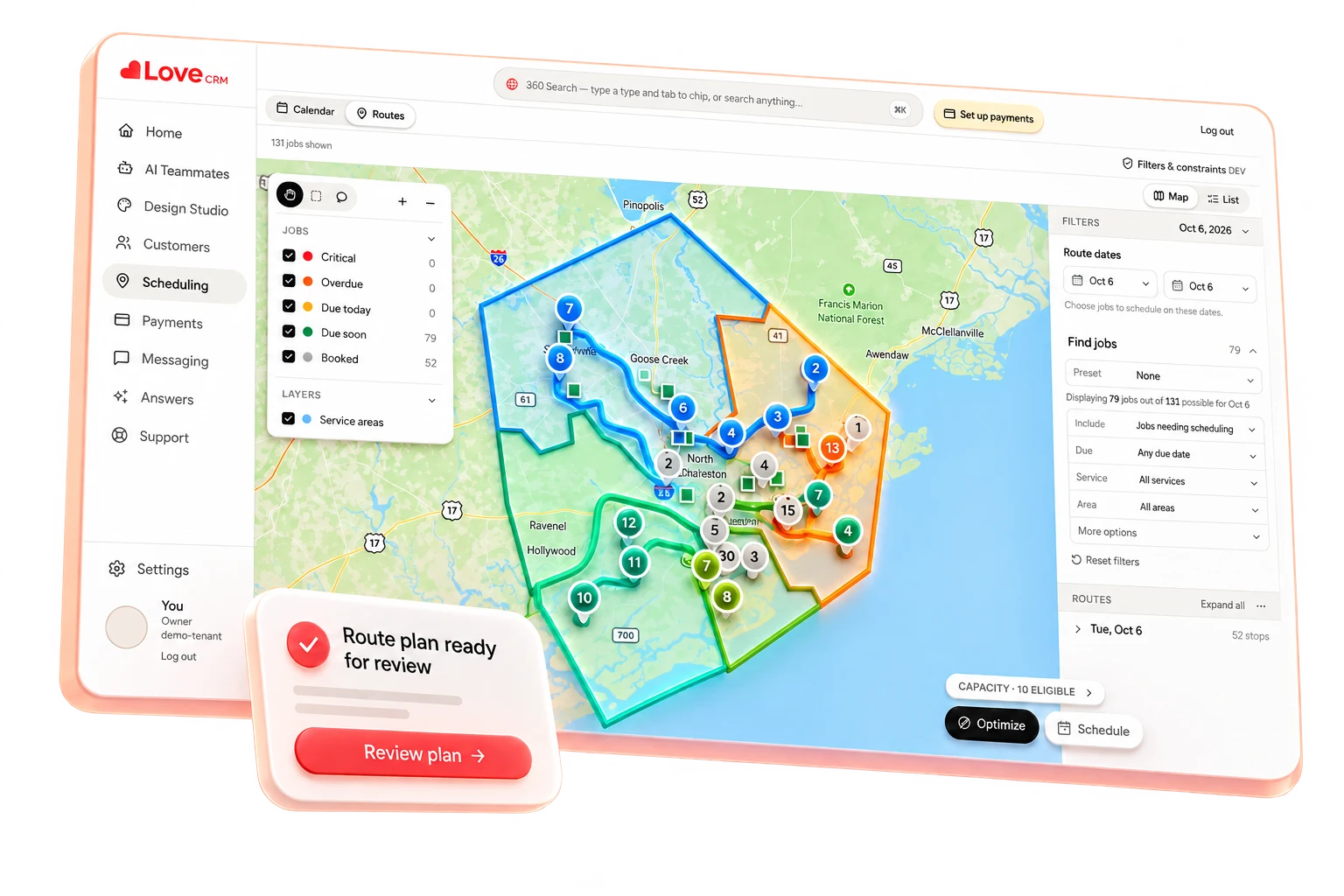
Turn due work, booked visits and technician availability into a proposed day that makes operational sense. Love brings the plan together. Your team reviews, adjusts and saves.
Schedule demoEarly access. Confirm the fit for your operation in a demo.
01 / Start with the work
A route begins before the first stop.
A pest-control book might combine quarterly visits due this week with a treatment already booked for Wednesday morning. A lawn-care round brings its own completion windows, property needs and technician assignments. A nearby address is useful only if the work is actually eligible for that day.
Job Pools bring that candidate work into focus. Select the pool and planning dates first; then let the proposed plan account for service time, working hours and the appointments your customers already expect.
- Work
- Appointment status & due status
- Timing
- Relative due period & frequency
- Service
- Service type & property type
- Customers
- Customer status & service area
Keep the promise behind the recurring visit: place it within its completion window, not simply in the next empty space.
02 / Choose → propose → review
See the day take shape.
Follow nine fictional visits through one planning date. Six fit on two solo-technician routes. Two booked arrivals stay pinned. Three visits still need your team’s judgment.
Illustrative walkthrough · fictional people and drive times
The right work, before the right order.
9 candidate visits. Two already have booked arrivals. Pull-forward and even split are off in this example.
- Jordan Lee
Quarterly pest · 45 min
Booked · PinnedBooked 8:30 arrival · Alex / Oct 21 locked - Casey Brooks
Pest follow-up · 30 min
RecurringCompletion window Oct 19–23 · Required license eligible - Avery Hill
Quarterly pest · 45 min
RecurringCustomer arrival window 10 am–noon - Taylor Reed
Lawn treatment · 40 min
Booked · PinnedBooked 8:30 arrival · Sam / Oct 21 locked - Morgan Carter
Lawn treatment · 40 min
RecurringCompletion window Oct 20–24 - Jamie Park
Lawn follow-up · 30 min
RecurringPreferred east service area · Eligible for Sam - Riley Lane
Initial pest service · 90 min
RecurringBoth technicians reach the selected 3-stop cap. - Quinn Ellis
Lawn treatment · 40 min
RecurringArrival requested after 4 pm; selected shifts end at 3 pm. - Drew West
Quarterly pest · 45 min
RecurringProperty address has no usable map location.
03 / The details make it workable
More than dots on a map.
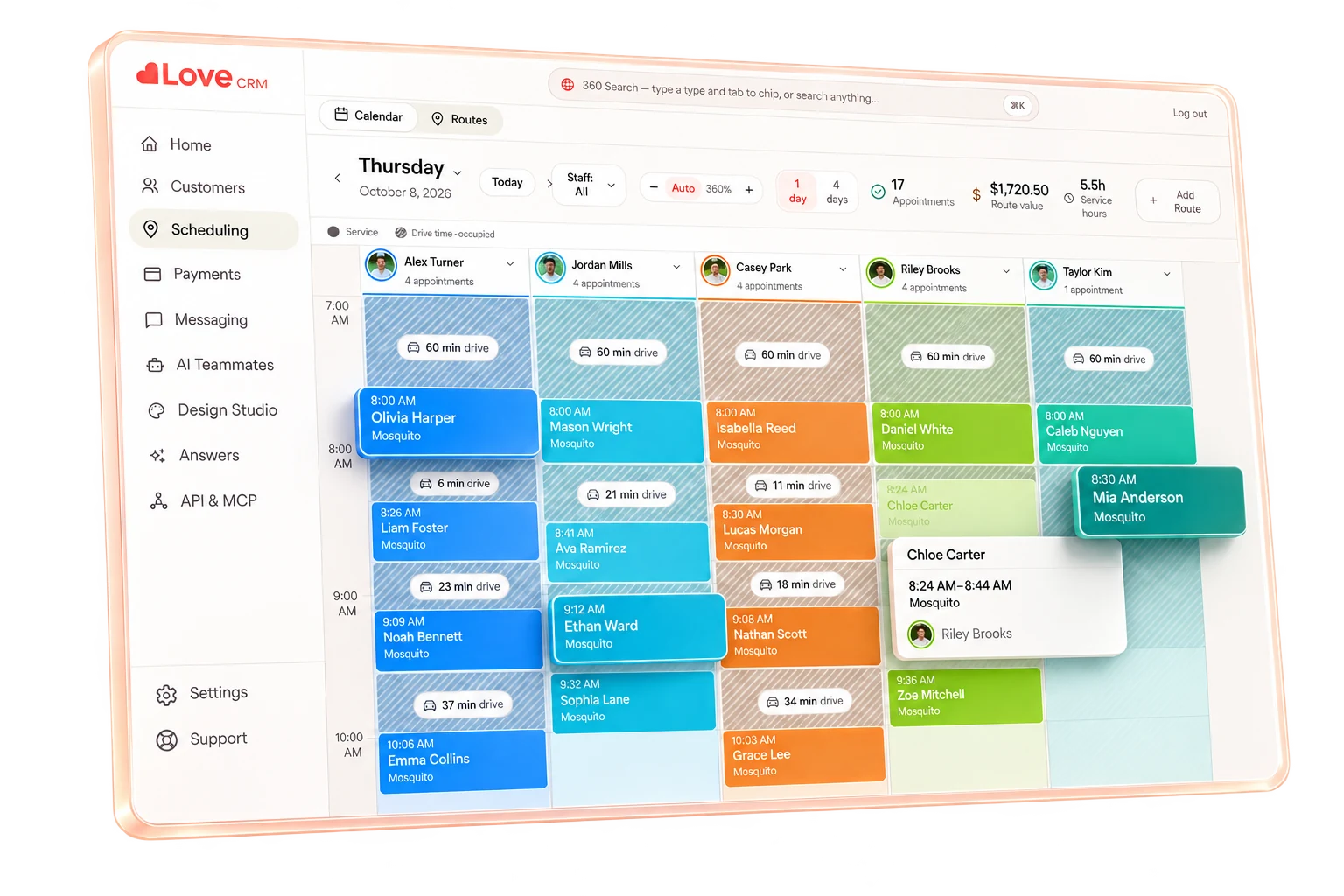
A useful route gives a technician time to finish the service, arrive when the customer expects, and meet the configured license requirements. Love brings those details into the proposed day.
Love uses road-based travel times alongside service durations. You choose the daily stop cap, shift start and length, and selected dates. Optional even splitting can guide balance with slack; it does not require every route to have the same stop count.
In the walkthrough, Jordan’s booked 8:30 arrival stays with Alex. Avery’s 10 am–noon window shapes the next part of the day. Quinn’s after-4 pm request cannot fit a shift ending at 3 pm. The tradeoff stays visible instead of becoming a surprise in the field.
Finish inside the service window
Recurring due dates and completion windows keep upcoming work from being pulled too early. Customer arrival windows constrain the time of day.
Plan for a real working day
Service durations, shifts, unavailable days, time blocks, breaks and stop caps shape capacity. The technician’s home/start location provides context for travel to the first stop and from the last stop.
Keep protected work protected
Booked crew/day locks and required or excluded technicians are not area preferences. Selected-scope reordering can hold the chosen crew and day, with first/last stops and arrival anchors.
Meet the configured license requirements
Love considers technicians with an active license that matches the work’s configured requirements. If none is eligible, the visit stays unassigned with a warning so your office can choose the next step.
Prefer an area, without pretending it is a fence
Service-area polygons guide assignment through soft preferences. They do not override hard customer timing or protected assignments, and are not absolute geographic compliance rules.
04 / Room for the next job
Make room for the right next job.
Turn on “Pull forward to fill capacity” when you want upcoming due work considered from the same Job Pool. Love looks nearest due first and stays within each visit’s completion window. Leave it off when you want the planning scope to stay narrower.
After a change, a scoped reroute can reorder a selected set while keeping its chosen technician and day. You can preserve a first stop, last stop or arrival anchor rather than rebuilding the whole book.
Your dispatcher reviews the proposed replacement, coordinates any customer changes, and saves the plan when it is ready. The decision stays with your people.
A separate example: your dispatcher removes Jamie’s visit from Sam’s draft after a customer change. The other two stops stay on Sam’s selected day.
40 minutes of service would stay within the selected 3-stop cap.
Pull-forward is off. An opening alone does not automatically bring another visit into the plan.
05 / Needs a decision
The work that did not fit
still belongs to you.
Optimize results distinguish “On the plan” from “Needs a decision.” A capacity limit, incompatible window or unusable address is a reason to act—not a reason for a visit to disappear.
Riley Lane
CapacityBoth technicians reach the selected 3-stop cap.
Human next step: Review another selected date or eligible technician, or deliberately change the stop cap after checking the working day.
Quinn Ellis
Arrival windowArrival requested after 4 pm; selected shifts end at 3 pm.
Human next step: Discuss a workable arrival window with the customer before changing their visit, or select a compatible day.
Drew West
Address needs attentionProperty address has no usable map location.
Human next step: Verify the property address and map location, then build a fresh draft with reliable travel context.
Before saving, Love checks appointment membership, status, locks and revisions. If work changed while your team was reviewing, the proposed plan must still pass those checks.
Practical questions
Clear expectations.
Better decisions.
What does supervised full self-routing mean?
Love builds a proposed route plan from the work and constraints you select. Your people inspect the draft, adjust it, and explicitly save it. Optimize is not autonomous dispatch, and a draft does not send customer messages or obtain consent.
How does Love choose recurring work?
A Job Pool is a saved filter over candidate appointments. It can use appointment and due status, a relative due period, service type, customer status, property type, service area, and frequency. Your selected planning dates and each recurring service’s completion window shape what can be placed. Optional pull-forward considers upcoming due work from that same pool, nearest due first, only inside its completion window.
What happens when a visit cannot fit?
It remains visible in Needs a decision, with an explanation such as capacity, an incompatible window, or a missing address. Review the reason, correct the record or change the planning scope, and build another draft. An unplaced visit is not silently dropped from your work.
Can optimization move saved appointments?
Booked day and crew locks are planning constraints. A scoped reroute can change the order of a selected set while holding its chosen crew and day, with deliberate first or last stops and arrival anchors. Proposed changes remain separate from an explicitly saved plan; saving also checks status, membership, locks, and whether the work changed during review.
Are service areas hard boundaries?
No. Service-area polygons guide assignments as preferences rather than absolute geographic fences. Customer timing, protected work, and required or excluded technicians still matter. Use assignment constraints for work that must stay with a particular eligible technician, rather than treating an area preference as a compliance rule.
Does routing account for technician licenses?
Yes. When license requirements are configured for the work, Love considers technicians whose active licenses meet the configured license requirements. If no technician is eligible, the visit remains unassigned with a warning so your team can resolve it.
Does the current solver support multi-person crews?
Current automated planning supports one technician per active solo crew. Multi-person crew routing is skipped with warnings, not optimized as an arbitrary crew combination. Bring your crew model to a demo so we can discuss the fit.
How does Love estimate travel time?
Love uses road-based travel estimates between stops and accounts for the time each service takes. Working hours, breaks, customer arrival windows, protected assignments and daily stop caps help shape a workable proposed day. Your team reviews that draft before saving. Love is in early access; a demo is the right place to confirm the fit and availability for your account.
Keep exploring
One plan. A connected operation.
Built around your working day
Bring your routes.
Keep your judgment.
Show us how your team plans recurring service, booked visits and exceptions. Explore Supervised Full Self-Routing in an early-access demo and confirm what fits your setup today.
Schedule demo